

Swipe · Match · Stop arguing
I built an app because my friends couldn’t pick a film.
PickIt gives everyone in a room the same deck to swipe through privately, then shows the choices they share. Here’s how I designed and built it.
Free on iPhone. Android version coming soon to Google Play.
- Role
- Designer and builderOn my own, building with AI
- Platform
- iPhoneiOS 15 or later. Android coming soon.
- On the App Store
- Since 24 April 2026Version 1.1 on 25 September 2026
- Price
- FreeNo ads, no account, no tracking
- Decides
- Films, TV and foodCinemas, streaming and restaurants
- Built with
- Flutter and CloudflareWorkers and Durable Objects
01 · Where it started
We needed a way to choose together.
Picture a group on a sofa, four streaming apps open and forty minutes spent deciding. There can be too much to watch and no clear way to choose something everyone would accept.
I focused on the process. A suggestion can be dismissed before everyone has had a say. The most vocal person can steer the choice, while someone quieter goes along with it. I wanted each person’s vote to count before the discussion took over.
That led me to ask: how does a group hear everyone without it turning into a meeting? The app would need to help people reach a shared choice.
Opinions arrive one at a time, so an early response can influence the next one.
The person writing the options influences what the group can choose.
People have to take turns, and seeing each other’s choices can make a private preference harder to express.
02 · Sketching the solution
Everyone swipes the same deck, privately, at the same time.
I built the flow around a shared set of choices and private votes.
Use a familiar swipe
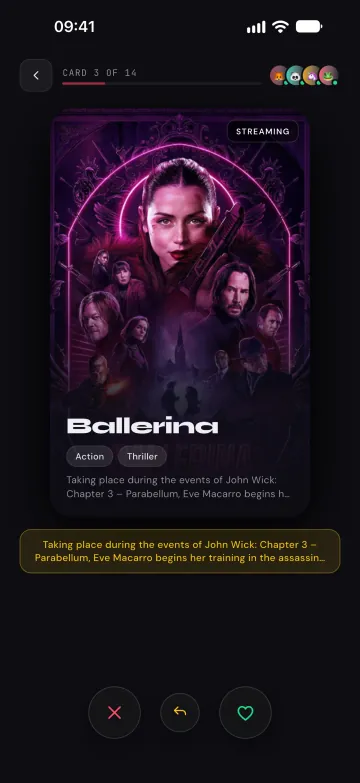
Swipe left for no or right for yes. Each swipe becomes a private input to a group calculation.
Give everyone the same choices
Votes are comparable when everyone sees the same options. The host sets the category and filters, and every phone receives the same cards.
Keep votes private
Everyone votes at the same time without seeing anyone else’s answers. The room then reveals the overlap.
Keep joining simple
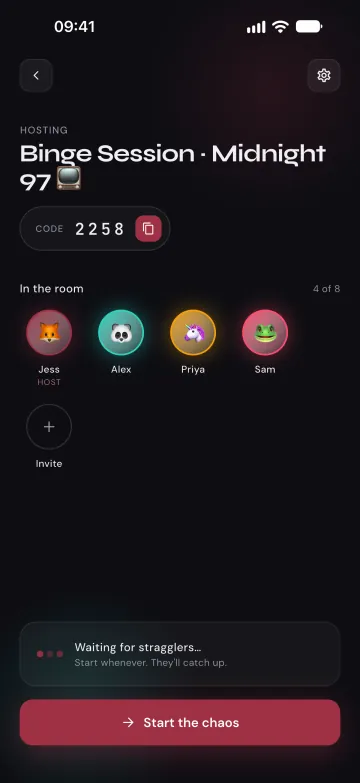
A short room code and an emoji let people join without an account or profile. Every room deletes itself within 24 hours of the last person joining.
Plan for disagreement
A perfect match won’t happen every time. Most of the design effort went into what happens when the group doesn’t agree.
How a round ends
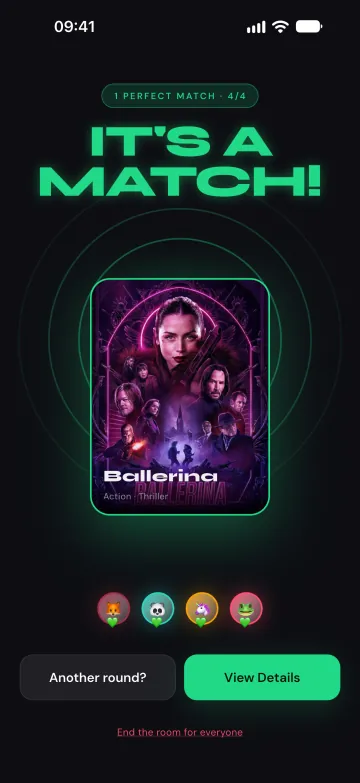
Everyone liked it. The app marks the match with confetti.
More than half the group agreed.
A quick revote on just the tied picks. Still tied after the last-chance round? Fate picks one.
Reshuffle, broaden the choices or roll the dice for a random pick.
03 · Building it
I designed it, then built it with AI.
I’m not a Flutter developer. I built PickIt by describing the behaviour I wanted, reviewing the generated code and testing it on a real phone. I repeated that cycle hundreds of times.
Getting a working screen in minutes meant I could keep designing in the running app. Testing on a phone brought out the awkward states: someone joining late or leaving halfway through, a full room, or an API returning no results.
The most time went into real-time sync (keeping the deck and progress consistent on every phone), the failure paths (reconnections, absent or late participants and empty results), and release work: icons, store metadata, privacy wording and responding to rejections.
- Flutter
- Dart
- Riverpod
- go_router
- Cloudflare Workers
- Durable Objects
- WebSockets
- SQLite
- TMDB
- Apple Maps
- Google Places
- OpenStreetMap
Each room manages its own state
Each room code maps to one Cloudflare Durable Object, which holds its deck, members, votes and result. Every phone uses that same room state, without a separate database to synchronise.
Fallbacks for restaurant results
TMDB supplies the films and TV shows. Restaurant results come from Apple Maps when everyone in the room is on an iPhone, otherwise from Google Places, with OpenStreetMap and bundled data as fallbacks so the deck can still load if a service is unavailable.
04 · The result
Ten seconds to start. About a minute to finish.
Create a room and share the code. Everyone swipes, then the room shows the result.
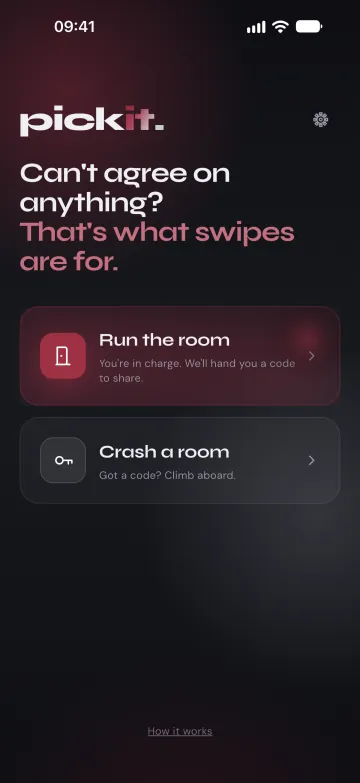
Start or joinHost a room, or jump into a friend’s with a short code. 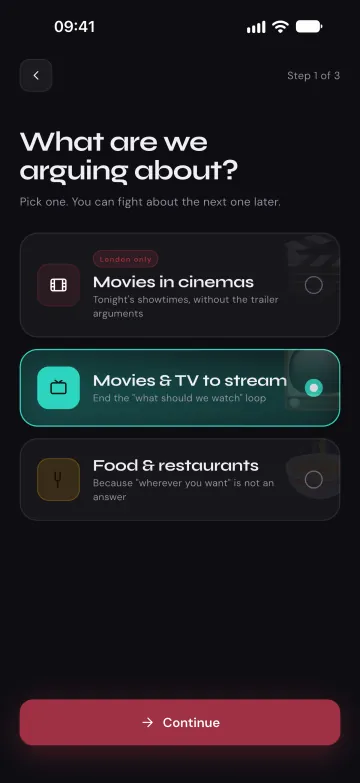
Choose the categoryFilms in cinemas, films and TV to stream, or food. -
Share the codeFriends join with a 4-digit code. Up to eight people per room. 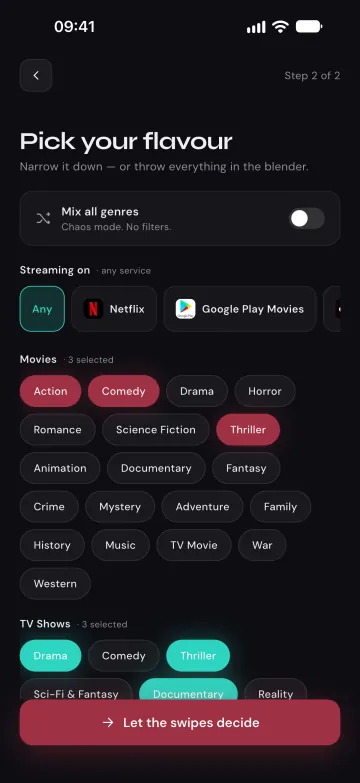
Set the filtersGenres, and the streaming services the group actually has. -
Everyone swipesThe same deck on every phone, swiped at the same time. 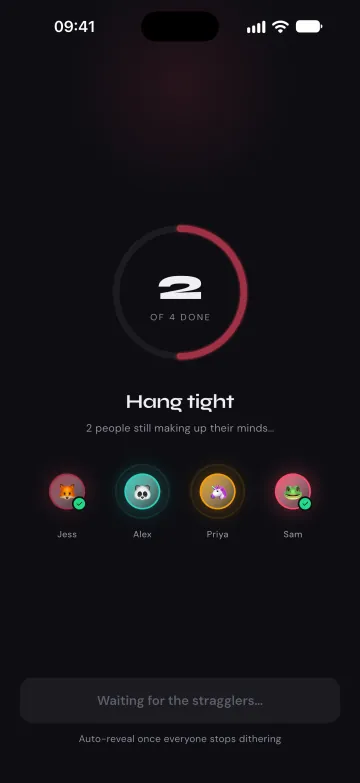
Live progressThe room shows who’s finished, never how they voted. -
The resultA perfect match when everyone said yes. 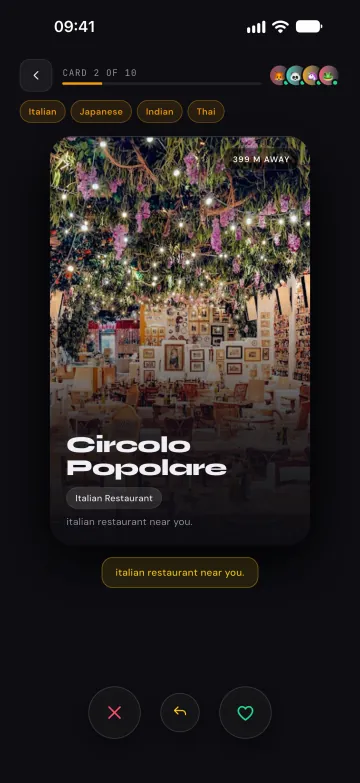
Dinner, tooReal places near the host, with real photos.
05 · Current status
What's built and working.
Built and working
- On the App Store since 24 April 2026, with version 1.1 out on 25 September 2026
- Real-time rooms for up to eight people, no account required
- One shared deck, private simultaneous voting, live progress
- Perfect / majority / tie / no-match resolution with recovery paths
- Films, TV and restaurants, with fallbacks when an API is unavailable
- Drop out on patchy signal and you rejoin as yourself, votes intact
- Rooms delete themselves within 24 hours of the last person joining, by design
Coming next
- Android: the app heads to Google Play next
- Cinema discovery beyond London, where it lives today and links out for showtimes
Settle it in sixty seconds.
Free. No account. No ads.
Android version coming soon to Google Play.